

How Google UPI Circle Is Going To Change Digital Payments?
Google has introduced a new UPI feature called UPI Circle for its Google Pay app. This new function is intended to facilitate financial transactions for people who do not have access to a bank account or are afraid to use digital payment methods. According to Google, UPI Circle will be accessible shortly on the app. UPI Circle, launched in partnership with the National Payments Corporation of India (NPCI), intends to aid individuals who still rely on cash by allowing trusted friends and family members to assist them in making digital payments.
What is UPI Circle?
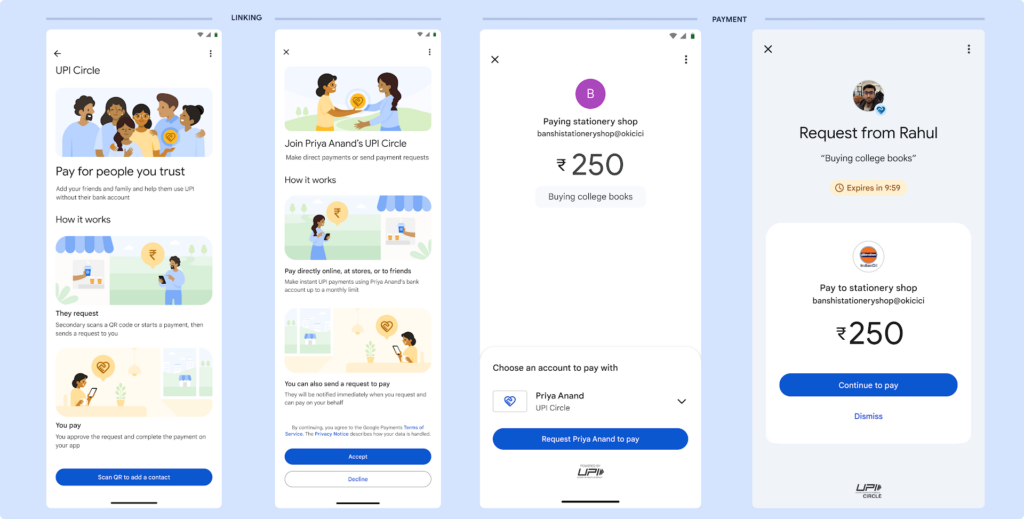
UPI Circle on Google Pay enables the principal user to outsource digital payment responsibilities to trusted contacts like family members or friends. This function is handy for people who do not have access to a bank account or struggle to manage digital payments independently. UPI Circle does not require the secondary user to link a bank account; payments can be made through the primary user’s account.
The UPI Circle feature offers two types of delegation:
- Full Delegation: The primary user sets a monthly limit of up to ₹15,000, allowing the secondary user to make payments independently within that amount without requiring additional permissions.
- Partial Delegation: The primary user maintains complete control over all transactions the secondary user starts. The principal user is prompted to approve each payment, ensuring they are informed of and involved in every transaction.
After linking a secondary user, there is also a 30-minute cool-off period during which no transactions can be completed. This provides an additional degree of security. According to Google, UPI Circle will benefit families with older members who are hesitant to use digital payments and individuals managing payments for dependents or domestic care.
How to Use UPI Circle?
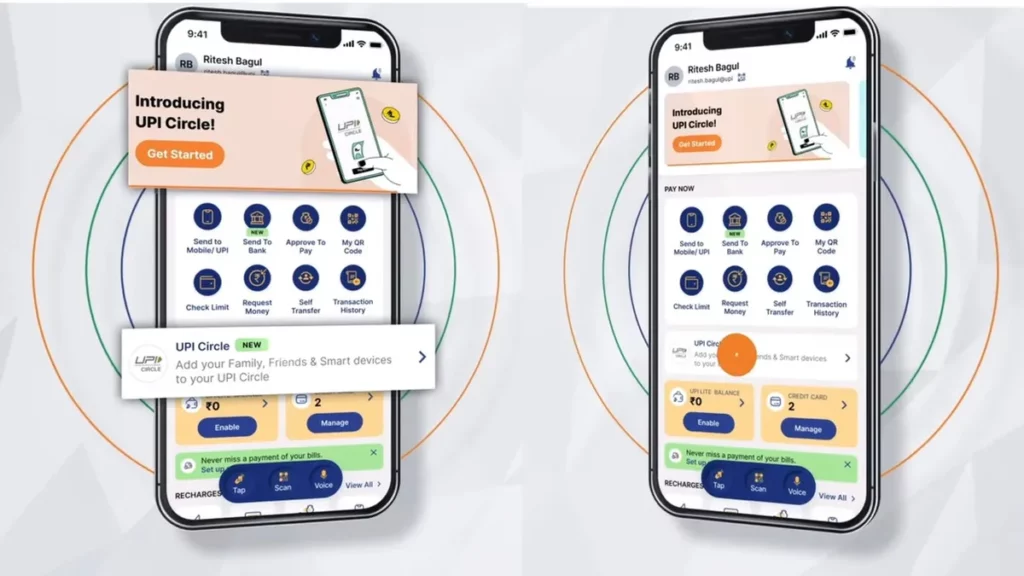
Google is bringing out the UPI Circle functionality to both Android and iOS. Users must update their app to see if the feature is enabled. Once the feature becomes available:
Add someone to your UPI Circle:
- To utilise Google Pay, the primary account holder must have an active bank account linked to it. The secondary user should have a UPI ID, and their phone number should be maintained in the primary user’s contacts.
- To make payments from the primary user’s account, the secondary user must open the UPI app and hit the QR code icon.
- The principal user will then navigate to the UPI Circle section by tapping their profile photo or initials on Google Pay.
- The primary user chooses whether to delegate fully or partially.
- The secondary user must then accept the invitation to complete the setup.
Making a Payment using UPI Circle
Once the UPI Circle is established, the secondary user can make payments independently within the Rs 15,000 monthly limit, which includes costs of up to Rs 5,000 per transaction. Whenever a secondary user begins a payment request, the primary user must approve or deny it, depending on the information given. Notably, primary and secondary users can check the status of their payment requests in real time via the UPI Circle portion of their profiles. This feature will also include a history of all completed transactions to increase transparency.
Google UPI Circle is set to revolutionize digital payments by enabling seamless, real-time transactions across borders, enhancing user convenience and security. This innovation simplifies international transfers, making them as easy as local payments, and paves the way for a more interconnected global financial ecosystem. Like this post? Don’t forget to check out our other short stories in our Technology section.